Authentication tells your Node.js SaaS app who the user is. Authorization decides what that user can do. That second part is where many SaaS products get stuck.
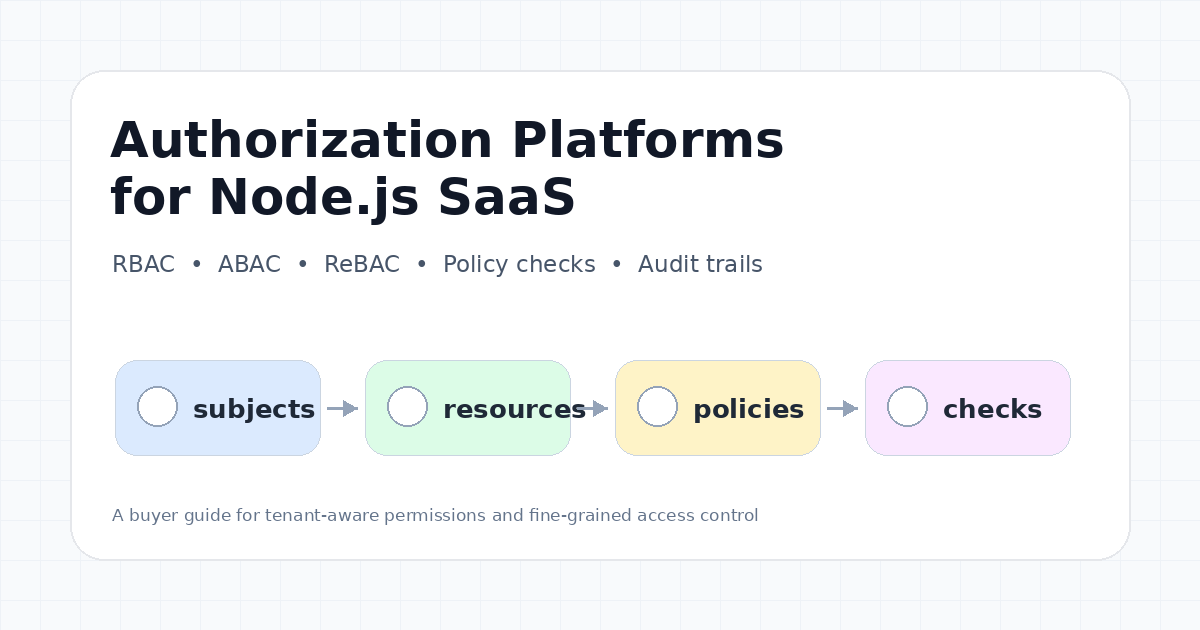
A simple admin and member role may work for version one. Then customers ask for project-level access, custom roles, read-only finance users, workspace admins, shared documents, delegated access, service accounts, AI agents, and audit trails. Suddenly authorization is no longer a few if statements in Express middleware. It is product infrastructure.
This guide compares the most relevant authorization and RBAC platforms for Node.js SaaS apps in 2026: OpenFGA, Auth0 FGA, Permit.io, Cerbos, WorkOS FGA, Aserto, and Oso. It focuses on production architecture, buyer trade-offs, and when each model makes sense.
What authorization platforms solve
A SaaS authorization platform helps you centralize access decisions instead of scattering permissions across controllers, database queries, frontend conditions, and one-off admin scripts.
In production, the hard questions are rarely “does this user have a role?” They are usually more specific:
- Can this user view this workspace but not that one?
- Can a contractor edit one project but not another?
- Can an organization admin invite users but not change billing?
- Can a support engineer impersonate a user, and is that recorded?
- Can an AI agent read only the documents this user is allowed to read?
- Can a customer define a custom role without waiting for an engineering release?
- Can compliance teams audit who had access to a resource last month?
A good authorization layer gives your Node.js app a clear answer to can(user, action, resource) while keeping the policy model maintainable as the product grows.
Quick comparison table
| Platform | Best fit | Authorization model | Strengths | Watch out for | Pricing note |
|---|---|---|---|---|---|
| OpenFGA | Teams that want an open-source fine-grained authorization engine | ReBAC, RBAC, ABAC-style use cases | Open-source, Zanzibar-inspired, friendly modeling language, APIs and SDKs | You operate the service and data model yourself | Open-source; managed options vary, confirm before publishing |
| Auth0 FGA | Teams already using Auth0 / Okta identity stack | Relationship-based FGA | Managed enterprise-grade FGA, audit trail, B2B and AI agent positioning | Best fit when you accept Auth0/Okta ecosystem alignment | Confirm current commercial terms before publishing |
| Permit.io | Teams that want RBAC, ABAC, ReBAC, policy UI, audit logs, and developer tooling | RBAC, ABAC, ReBAC | Strong productized permissions layer and policy engine workflow | Public pricing details may be dynamic; verify exact tiers before publishing | Confirm before publishing |
| Cerbos | Teams that want policy-as-code with an external PDP | ABAC / policy engine | Decouples policy decisions from app code, can run close to services | You still own policy design, rollout, testing, and deployment topology | Confirm Cerbos Hub pricing before publishing |
| WorkOS FGA | B2B SaaS teams already using WorkOS enterprise identity | Resource-scoped RBAC / FGA | Integrates with WorkOS AuthKit, RBAC, SSO, Directory Sync, and Admin Portal | More ecosystem-specific than standalone policy engines | WorkOS pricing page shows transparent product pricing, but FGA details should be confirmed before publishing |
| Aserto | Teams that like policy-as-code, edge authorizers, and directory-backed authorization | Policy-as-code / relationship-aware authorization | Free starter tier, hosted authorizers, policy repos, decision log retention on higher plans | Evaluate ecosystem fit and deployment model | Aserto pricing page lists Starter free and Essentials at $0.20 per user/month as of July 10, 2026 |
| Oso | Teams building authorization for agents or custom app logic | Policy-driven authorization | Strong authorization focus and AI-agent least-privilege positioning | Pricing and product packaging should be confirmed | Confirm before publishing |
1. OpenFGA and Auth0 FGA
OpenFGA describes itself as an open-source authorization solution for building granular access control with an easy-to-read modeling language and APIs. Its site states that it takes ideas from Google’s Zanzibar paper and supports relationship-based access control, role-based access control, and attribute-based access control use cases. It also highlights SDK support, millisecond authorization checks, open governance, and CNCF incubation.
That makes OpenFGA a strong choice when you want a serious fine-grained authorization model without locking the policy model inside one proprietary vendor.
Auth0 FGA builds on the same foundation but offers a managed, enterprise-oriented service. Auth0’s current page positions FGA for complex B2B APIs, multi-tenant apps, AI agents, RAG systems, MCP servers, least-privilege access, immutable audit trails, and large-scale resource authorization.
When OpenFGA is a good fit
OpenFGA is best when your team is comfortable operating infrastructure and wants explicit control over the authorization model. It is a natural fit for collaborative SaaS products where relationships matter:
- Organization owns workspace
- Workspace contains projects
- Project contains documents
- User belongs to organization
- Group has viewer access to project
- Editor can update documents inside a project
This model is hard to express cleanly with only tenant-wide roles.
When Auth0 FGA is a good fit
Auth0 FGA is more attractive when the identity stack is already Auth0 or Okta, or when you want a managed enterprise authorization control plane. It is also relevant if AI agents, MCP servers, or RAG systems need resource-aware access checks. In those systems, “the user is authenticated” is not enough. The agent must be restricted to the exact resources the user or session is allowed to access.
2. Permit.io
Permit.io positions itself around permissions for the AI era, with products for app and API permissions, AI agent security, RBAC, ABAC, ReBAC, policy engines, audit logs, CLI workflows, and MCP gateway use cases.
For Node.js SaaS teams, Permit.io is interesting because it targets the product side of permissions, not only the low-level policy evaluation side. That matters when non-engineers need to understand, modify, or audit permission behavior.
When Permit.io is a good fit
Permit.io is worth evaluating when:
- You want RBAC, ABAC, and ReBAC options in one platform
- Product teams need a permission UI or customer-facing permission elements
- You need audit logs around permission changes and decisions
- You want to avoid building a custom admin interface for roles
- You expect AI agent authorization or MCP access control to become part of your product
The strongest use case is a B2B SaaS app moving from hardcoded roles to a permissions system that can evolve with enterprise customer requirements.
What to verify
Because pricing and packaging can change, confirm exact tiers, monthly active user limits, policy decision limits, environment support, audit log retention, and self-hosting or hybrid deployment options before publishing or buying.
3. Cerbos
Cerbos focuses on externalized authorization. Instead of burying access rules inside your Node.js routes, you define policies and ask Cerbos whether a principal can perform an action on a resource.
Cerbos documentation describes it as an authorization management platform for access control. Its public materials emphasize policy-based authorization, customer stories around granular roles and permissions, and the benefit of separating decision making from application code.
When Cerbos is a good fit
Cerbos is especially useful when your team wants policy-as-code:
- Policies live outside business logic
- Authorization logic can be reviewed and tested separately
- A policy decision point can run near the app
- Engineering teams can reason about access control changes through versioned policy files
For Node.js apps, this can be cleaner than turning every route into a growing nest of permission conditions.
What to evaluate carefully
Cerbos does not remove the need for good modeling. You still need to define principals, resources, actions, attributes, and policy testing discipline. You should also decide how policies are deployed, how policy versions are rolled back, and how decision logs are retained.
If your product needs customer-defined roles through a polished UI, compare Cerbos with more productized permission platforms. If your team wants strong policy-as-code control, Cerbos can be a better fit.
4. WorkOS FGA
WorkOS FGA is designed for B2B SaaS teams that already care about enterprise readiness. Its FGA documentation says fine-grained authorization extends the existing WorkOS RBAC system to handle complex, fast-changing authorization needs. It keeps the RBAC mental model while adding hierarchical, resource-scoped access control.
WorkOS documentation describes subjects, resources, privileges, role assignments, access checks, and hierarchical permission inheritance. It also says FGA can be adopted incrementally alongside existing RBAC. That incremental path is valuable — many teams do not want to rewrite authorization all at once.
When WorkOS FGA is a good fit
WorkOS FGA is a strong candidate when:
- You already use WorkOS AuthKit, RBAC, SSO, Directory Sync, or Admin Portal
- Your authorization model is mostly resource-scoped roles
- You sell to enterprise customers and need user lifecycle integration
- You want to avoid a separate DSL-heavy policy system
- You want an enterprise identity platform and authorization layer to fit together
WorkOS pricing is unusually transparent for several enterprise identity products. Its pricing page currently shows AuthKit free for up to 1 million users and per-connection SSO / Directory Sync pricing, but FGA-specific pricing should still be confirmed before publishing because product packaging can change.
5. Aserto and Oso
Aserto is another authorization platform worth evaluating. Its pricing page currently lists a free Starter tier for personal projects, open-source software, and commercial evaluation, plus an Essentials plan at $0.20 per user/month, with Pro and Enterprise on contact-us pricing. The same page mentions policy repositories, authorizer instances, identity providers, managed edge authorizers, decision log retention, and run-in-your-own-VPC options on higher tiers.
Aserto is interesting if your team likes policy-as-code workflows, centralized policy repositories, and authorizers that can run near your services.
Oso has long been associated with developer-friendly authorization. Its current pricing page is framed around authorization for agents and automated least privilege. The page states that a user is a human invoking agents and that volume pricing is available through annual contracts. That positioning is especially relevant as SaaS products expose APIs, MCP servers, internal tools, and AI agents that need strict least-privilege enforcement.
How to think about them
Aserto and Oso are worth comparing when your authorization needs are not just “roles in a dashboard.” They are more relevant when policy logic, least privilege, service-to-service checks, or agent access controls are central to the product.
Recommended Node.js architecture
A clean Node.js authorization stack should separate authentication, resource loading, policy evaluation, enforcement, and audit logging.
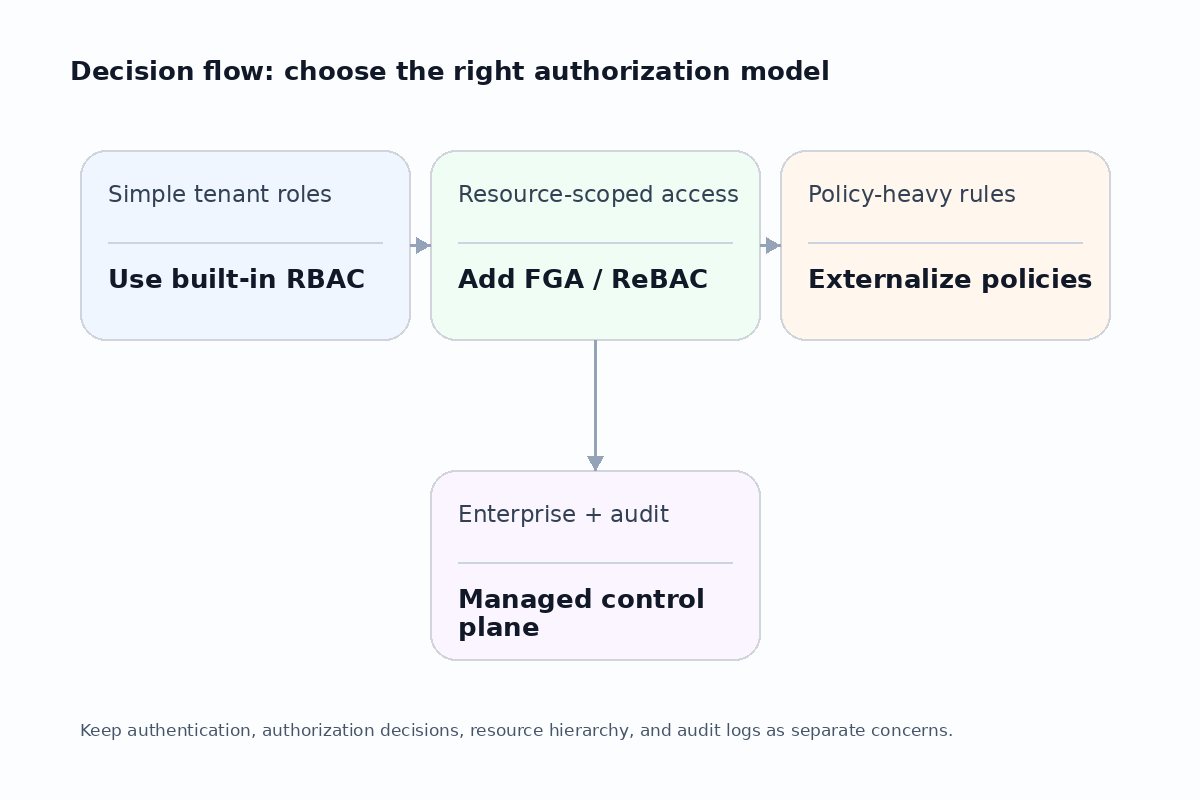
A typical request path might look like this:
- The request enters an API route, Express middleware, Fastify hook, Next.js route handler, or background worker
- Authentication identifies the user, organization, session, and possibly service account or agent identity
- The app resolves the target resource, such as a workspace, project, document, invoice, API key, or deployment
- The authorization layer evaluates
can(user, action, resource) - The app enforces allow or deny
- The decision is logged when compliance, support, or debugging requires it
Here is what a clean middleware pattern looks like in a Node.js Express or Fastify app:
// authz-middleware.ts — authorization middleware pattern
import type { Request, Response, NextFunction } from 'express';

interface AuthzContext {
  user: { id: string; orgId: string; roles: string[] };
  action: string;
  resourceType: string;
  resourceId: string;
}

async function authorize(ctx: AuthzContext): Promise<boolean> {
  // Call your authorization platform here — OpenFGA, Cerbos, Permit.io, etc.
  // Returns true if allowed, false if denied
  return true;
}

export function requireAccess(
  action: string,
  resourceType: string,
  resolveResourceId: (req: Request) => string
) {
  return async (req: Request, res: Response, next: NextFunction) => {
    const resourceId = resolveResourceId(req);
    const allowed = await authorize({
      user: req.user as AuthzContext['user'],
      action,
      resourceType,
      resourceId,
    });

    if (!allowed) {
      return res.status(403).json({
        error: 'Forbidden',
        detail: `Missing ${action} on ${resourceType}:${resourceId}`,
      });
    }

    next();
  };
}

// Usage in a route
app.get(
  '/api/projects/:projectId',
  requireAccess('read', 'project', (req) => req.params.projectId),
  async (req, res) => {
    // Safe: authorization already enforced
    const project = await getProject(req.params.projectId);
    res.json(project);
  }
);
Do not confuse frontend visibility with authorization. Hiding a button in React is useful for user experience, but the server must still enforce the decision.
Cost factors and lock-in
Authorization platforms can be priced by users, tenants, policy checks, environments, authorizer instances, audit retention, support tier, or enterprise integrations. Compare the full cost, not only the entry plan.
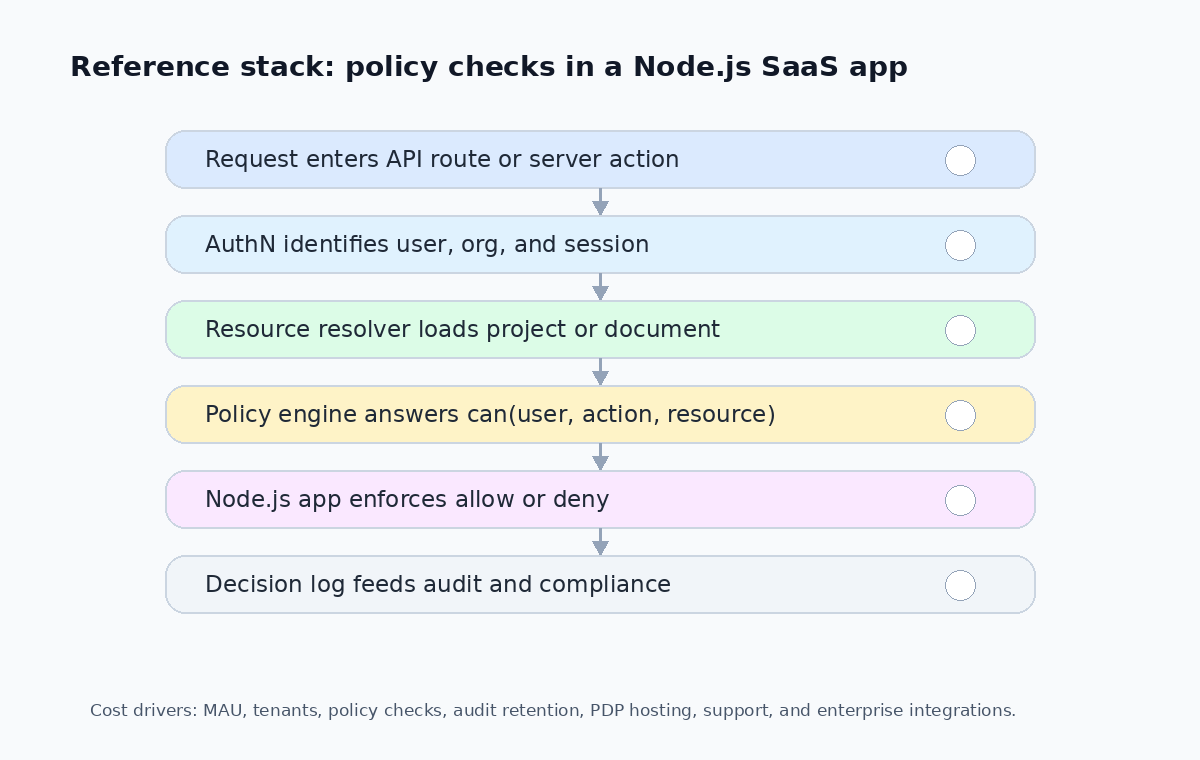
Important cost drivers include:
| Cost driver | Why it matters |
|---|---|
| Monthly active users | Many platforms price per MAU; spikes during onboarding or trials can surprise you |
| Number of tenants or organizations | Multi-tenant SaaS may pay per tenant, not just per user |
| Policy decision volume | Some platforms meter by API call count; cache decisions you can safely cache |
| Latency requirements | Remote authorization adds network latency; evaluate local PDP options if you need sub-5ms |
| Self-hosted vs managed | Self-hosting saves per-request cost but adds operational burden |
| Audit log retention | Longer retention windows often sit in higher pricing tiers |
| Admin UI and customer-facing permission elements | Productized platforms include these; DIY means building them yourself |
| SSO and directory sync integration | Often an enterprise-tier feature |
| Data residency and VPC deployment | Required for enterprise deals; verify availability before committing |
Lock-in is not only vendor lock-in. A messy authorization model can lock you into your own technical debt. If every permission rule is scattered across code, SQL filters, cron jobs, and frontend flags, migrating later becomes painful.
Recommendations by use case
If your product only has Admin and Member roles
Start with built-in RBAC. Keep it explicit, test it, and avoid overengineering. You may not need a full authorization platform yet. But design the model so it can evolve. Use clear permission names, avoid magic booleans, and centralize checks instead of duplicating conditions everywhere.
// Simple built-in RBAC — good enough for early stage
const PERMISSIONS: Record<string, string[]> = {
  admin: ['projects:read', 'projects:write', 'billing:read', 'billing:write', 'members:invite', 'members:remove'],
  member: ['projects:read', 'projects:write'],
  viewer: ['projects:read'],
};

function can(role: string, permission: string): boolean {
  return PERMISSIONS[role]?.includes(permission) ?? false;
}
If you have workspaces, projects, documents, and sharing
Evaluate OpenFGA, Auth0 FGA, or WorkOS FGA. Relationship-based or resource-scoped authorization is better suited to collaboration features than tenant-wide roles.
If you want policy-as-code
Evaluate Cerbos or Aserto. These platforms are attractive when engineering teams want versioned policies, review workflows, and externalized decision logic.
If customers need to manage permissions themselves
Evaluate Permit.io or WorkOS. Customer-facing permission management is a product feature, not just a backend function. A polished admin experience can matter as much as the policy engine.
If AI agents or MCP servers are part of your roadmap
Pay close attention to Auth0 FGA, Permit.io, Oso, and WorkOS positioning around agent access. The core requirement is least privilege at the resource level. An agent should not inherit broad access just because the user is authenticated.
Common implementation mistakes
Mistake 1: Mixing authentication and authorization
Authentication is not authorization. A user can be logged in and still not have access to a project, invoice, admin action, export, or AI tool. Keep the middleware separate.
Mistake 2: Putting permission rules only in the frontend
Frontend checks improve usability. They do not protect data. Always enforce authorization in the Node.js backend.
// ❌ Wrong: frontend-only gate
if (user.role !== 'admin') return <Redirect to="/" />;

// ✅ Right: server enforces, frontend only hides UI
// Backend middleware runs `can(user, 'projects:delete', projectId)` before mutation
Mistake 3: Creating too many roles too early
Role explosion is a sign that the model is not expressive enough. Instead of creating admin, super_admin, billing_admin, project_admin, project_admin_readonly, and many more variants, consider resource-scoped permissions or policies.
Mistake 4: Forgetting auditability
Enterprise customers often ask who changed access, who had access, and why an action was allowed. If you cannot answer, authorization becomes a compliance risk. Log authorization decisions with enough context to reconstruct the “who, what, when, why” later.
Mistake 5: Ignoring latency
Authorization checks happen on critical request paths. Evaluate latency, caching, fallback behavior, and failure modes before putting a remote decision call in every API route. Consider a local PDP or short-lived decision cache when latency budgets are tight.
Conclusion
Authorization starts as a simple helper function and becomes infrastructure faster than most Node.js SaaS teams expect.
- If your product is early and roles are simple, built-in RBAC is fine
- If you need collaborative resources, evaluate OpenFGA, Auth0 FGA, or WorkOS FGA
- If you want policy-as-code, compare Cerbos and Aserto
- If permissions are a customer-facing feature, Permit.io deserves attention
- If AI agents or MCP servers are entering the product, least-privilege authorization should be planned before broad access becomes a security problem
The core principle is simple: separate authentication from authorization, make resources explicit, centralize policy checks, and preserve auditability from the beginning.