Production bugs rarely arrive with a clean reproduction step. A user sees a blank page. A webhook retry fails silently. A background job throws after a deploy. A checkout request times out only for one customer. The logs contain clues, but the team still has to connect the error, release, stack trace, user, tenant, and impact. That is what error tracking platforms are for.
This guide compares the most practical error tracking platforms for Node.js SaaS apps in 2026: Sentry, Rollbar, Bugsnag, Highlight.io, and GlitchTip. The goal is not to crown one universal winner. It is to choose the platform that fits your debugging workflow, release process, budget, and compliance needs.
What Error Tracking Should Do for a Node.js SaaS App
A production-grade error tracking system should do more than send an email when an exception occurs. For a Node.js SaaS product, the platform should help you answer:
- Which release introduced this error?
- How many users, tenants, or paying customers are affected?
- Is this a new issue or a duplicate of an existing one?
- Which route, job, queue, webhook, or serverless function triggered it?
- Can we see the original readable stack trace through source maps?
- Is the error correlated with logs, traces, replays, or deploys?
- Who owns the fix?
- Should this wake someone up, create a ticket, or stay as a low-priority issue?
Plain logs are still important, but logs are not enough. Logs are often noisy, ungrouped, and disconnected from releases. Error tracking turns runtime failures into actionable issues.
Quick Comparison Table
| Platform | Best Fit | Strengths | Watch Out For | Pricing Note |
|---|---|---|---|---|
| Sentry | Most Node.js SaaS teams that want broad observability | Error monitoring, tracing, profiling, logs, replays, source maps, release workflow, large ecosystem | Can become a broader observability bill; configure sampling and quotas carefully | Developer free, Team $26/mo, Business $80/mo with included quotas |
| Rollbar | Teams that want focused error monitoring and predictable event handling | Real-time feed, intelligent grouping, stack traces, deploy tracking, rate limiting, retention options | Less broad than full observability suites; pricing uses occurrences, sessions, and credits | Free with 5K occurrences + 1K sessions; paid tiers confirmed before publishing |
| Bugsnag | Product and mobile-heavy teams that care about stability scores and release health | Error prioritization, stability monitoring, feature flag context, release analytics, performance options | Pricing and packaging should be confirmed; may be more enterprise-oriented | Confirm before publishing |
| Highlight.io | Full-stack teams that want errors, session replay, logs, and traces together | Open-source positioning, session replay, logs, tracing, AI error grouping, self-hosted enterprise option | If you only need backend exceptions, it may be more platform than needed | Free, Pay-as-you-go from $50/mo, Business from $800/mo |
| GlitchTip | Startups or teams wanting a low-cost Sentry-compatible or self-hosted option | Hosted and self-hosted options, simple event quotas, low monthly pricing, EU hosting option | Fewer enterprise workflow features than larger platforms | Free 1,000 events/mo, Small $15/mo, Medium $50/mo, Large $250/mo |
1. Sentry
Sentry is the default recommendation for many Node.js SaaS teams because it has moved beyond basic exception capture. Its Node.js documentation covers error monitoring, logs, tracing, profiling, source maps, cron monitoring, user feedback, feature flags, OpenTelemetry support, and AI agent monitoring.
The docs recommend initializing Sentry before other modules so auto-instrumentation and related monitoring features work correctly:
// Initialize Sentry at the very top of your entry point
import * as Sentry from "@sentry/node";

Sentry.init({
  dsn: process.env.SENTRY_DSN,
  environment: process.env.NODE_ENV,
  release: process.env.GIT_SHA,
  tracesSampleRate: 0.1,
  profilesSampleRate: 0.1,
  beforeSend(event) {
    // Scrub PII before events leave your infrastructure
    delete event.request?.cookies;
    return event;
  },
});

// THEN import the rest of your application
await import("./app");
Sentry’s pricing page currently lists a free Developer plan for one user, a Team plan at $26/month when billed annually with default pre-paid data, and a Business plan at $80/month. The same page shows included error, log, metric, span, replay, uptime, and cron-monitor quotas, with pay-as-you-go rates for additional usage.
When Sentry Is a Good Fit
Choose Sentry when you want one platform for:
- Node.js backend errors
- Next.js or React frontend errors
- Source maps
- Release tracking
- Performance tracing
- Logs and profiling
- Session replay
- Team alerts and ownership
It is especially strong for full-stack SaaS teams because frontend and backend failures can be investigated in the same workflow.
What to Configure Carefully
Sentry can capture a lot of data. That is powerful, but it also means you should configure sampling, PII scrubbing, alert rules, source map upload, environment separation, and spend notifications before production traffic grows.
For Node.js apps, pay attention to uncaught exceptions, unhandled promise rejections, background job errors, webhook handlers, serverless functions, and queue workers. These failures often do not show up as normal HTTP 500s.
2. Rollbar
Rollbar focuses on discovering, predicting, and remediating errors. Its pricing page highlights a Free plan with 5K occurrences and 1K sessions, real-time feed and alerts, intelligent error grouping, stack traces and telemetry, and deploy/version tracking. Paid tiers add more credits, retention, rate limiting, adaptive alerts, metrics API, SCIM provisioning, and longer retention.
Rollbar’s Node.js docs support JavaScript on both browser and Node.js sides, with framework guides and configuration references.
When Rollbar Is a Good Fit
Rollbar is attractive if you want a focused error monitoring workflow without adopting a large observability suite. It is a practical fit for:
- API-heavy Node.js products
- Small teams that want fast issue grouping
- Teams that care about deploy tracking
- Products with predictable error volume
- Teams that want budget protection and plan limits
Rollbar’s positioning around no-surprise billing and limit handling is useful for startups that do not want monitoring spend to spike unexpectedly after one bad deploy.
What to Evaluate
Compare grouping quality, release workflow, integrations, user/tenant context, replay needs, and whether your team also needs logs and tracing. If you already use another APM or log platform, a focused error tracker can be enough. If you want all signals in one place, Sentry or Highlight may be more attractive.
3. Bugsnag
Bugsnag, now part of SmartBear, is especially interesting when application stability is a product metric. Its pricing page emphasizes segmentation using custom diagnostic data, feature flag and experiment context, error burst protection, automatic error assignment, release stability monitoring, stability scores, release adoption tracking, and performance monitoring options.
That makes Bugsnag more than a raw exception inbox. It is designed to help teams prioritize errors based on user and release impact.
When Bugsnag Is a Good Fit
Consider Bugsnag when:
- You need to prioritize errors by customer impact
- Product teams care about stability scores
- You release frequently and need release health analytics
- Feature flags or experiments can introduce production errors
- You want automatic error assignment and triage workflows
This can be valuable for SaaS products where “how many paying customers are affected?” matters more than “how many stack traces arrived?”
What to Verify
Confirm current plan structure, event quotas, performance monitoring packs, integrations, retention, and enterprise support before publishing. Bugsnag can be strong, but pricing and packaging may be less simple than low-cost developer tools.
4. Highlight.io
Highlight.io positions itself as an open-source monitoring platform. Its pricing page lists a Free plan with 500 monthly sessions and AI error grouping, a Pay-as-you-go plan starting at $50/month, a Business plan starting at $800/month, Enterprise, and Self-Hosted Enterprise.
The same page includes usage categories for session replay, error monitoring, logging, and traces. That matters because many production bugs are not only backend exceptions. Sometimes you need to see the user session, browser console, network activity, logs, traces, and backend error together.
When Highlight Is a Good Fit
Highlight is worth evaluating when:
- Session replay is central to debugging
- Frontend and backend context must be connected
- You want logs, errors, traces, and replays in one workflow
- Open-source positioning matters
- You may need self-hosted enterprise deployment later
For Node.js SaaS teams with complex frontend flows, Highlight can reduce the gap between “the user says it broke” and “we can reproduce the exact request path.”
What to Watch
If your app is mostly backend API traffic, session replay may be less important. Also evaluate storage and ingestion costs carefully, because replays, logs, and traces can grow faster than error events.
5. GlitchTip and Self-Hosted Options
GlitchTip is a practical low-cost and self-hosted-friendly option. Its pricing page lists a hosted Free plan with up to 1,000 events per month, a Small plan at $15/month with up to 100K events, a Medium plan at $50/month with up to 500K events, and a Large plan at $250/month with up to 3 million events. It also states that the self-hosted version can run on your own server, and that EU hosting is available.
GlitchTip is especially attractive for startups that want basic error tracking without a large observability bill.
When GlitchTip Is a Good Fit
Choose GlitchTip when:
- You want a low-cost hosted plan
- You prefer self-hosting
- You need a Sentry-compatible style of issue tracking
- You do not need a large enterprise observability suite
- You want more control over data hosting
What to Consider Before Self-Hosting
Self-hosting is not free. You need backups, upgrades, monitoring, security patches, email delivery, storage, and incident response for the monitoring system itself. For small teams, hosted can still be cheaper than operational responsibility.
Recommended Node.js Architecture
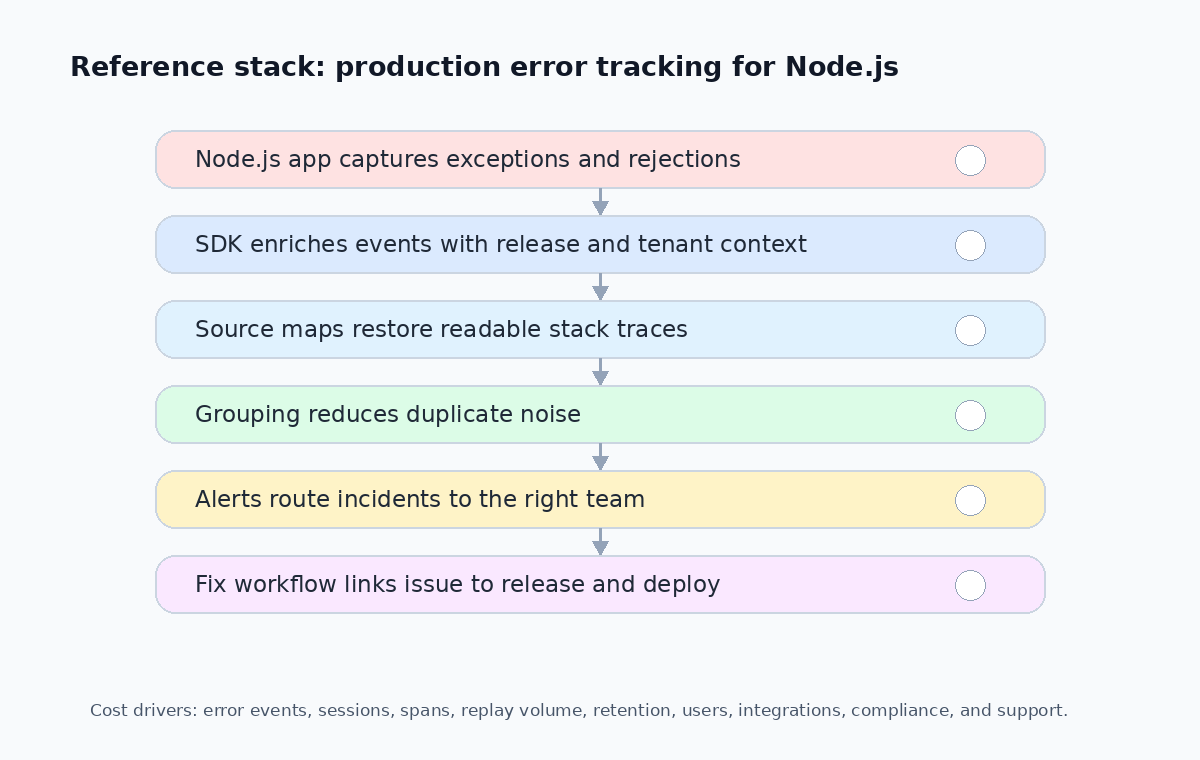
A good Node.js error tracking setup should be part of your release workflow, not just a package installed after production breaks. Use this pattern:
- Initialize the SDK before application modules load
- Capture uncaught exceptions and unhandled promise rejections
- Add release, environment, service, tenant, and user context
- Upload source maps during CI/CD
- Scrub secrets, tokens, emails, and PII before events leave your infrastructure
- Route alerts by ownership, severity, and customer impact
- Link issues to commits, pull requests, deploys, and incident records
- Review noisy alerts and update grouping or filters weekly
Here is a production-ready initialization pattern that covers uncaught exceptions and unhandled rejections:
import * as Sentry from "@sentry/node";

Sentry.init({
  dsn: process.env.SENTRY_DSN,
  environment: process.env.NODE_ENV ?? "development",
  release: process.env.GIT_SHA,
  tracesSampleRate: 0.05,
  beforeSend(event) {
    // Scrub sensitive data
    if (event.request?.headers) {
      delete event.request.headers.authorization;
      delete event.request.headers.cookie;
    }
    return event;
  },
});

// Capture tenant context in your request middleware
app.use((req, res, next) => {
  Sentry.setContext("tenant", {
    id: req.tenant?.id,
    plan: req.tenant?.plan,
  });
  Sentry.setUser({
    id: req.user?.id,
    email: req.user?.email,
  });
  next();
});
Do not wait until the first major incident to define severity rules. Decide early which errors create alerts, tickets, Slack messages, or only dashboard visibility.
Cost Factors and Lock-In
Error tracking pricing can look simple until traffic grows or one release generates millions of duplicate events. Compare tools across these cost drivers:
| Cost Driver | What to Check |
|---|---|
| Monthly error events | Event-based quotas and overage pricing |
| Session replay volume | Replay storage can grow faster than error events |
| Trace/span volume | High-throughput APIs generate many spans |
| Log ingestion volume | Log-based pricing adds up quickly |
| Data retention | Shorter retention reduces cost but limits investigation |
| Users and seats | Per-seat pricing increases with team growth |
| Projects and environments | Multi-tenant setups need more projects |
| Source map storage | Large frontend apps produce large source maps |
| SSO, SCIM, audit logs | Often gated behind enterprise tiers |
| Overage rules and caps | Surprise-free billing vs. auto-scaling quotas |
Also evaluate migration cost. If your app is deeply tied to one SDK’s custom context, grouping rules, dashboards, and release workflow, switching later can be painful. Keep your own release identifiers, deployment metadata, and critical customer-impact fields consistent across tools.
Recommendations by Use Case
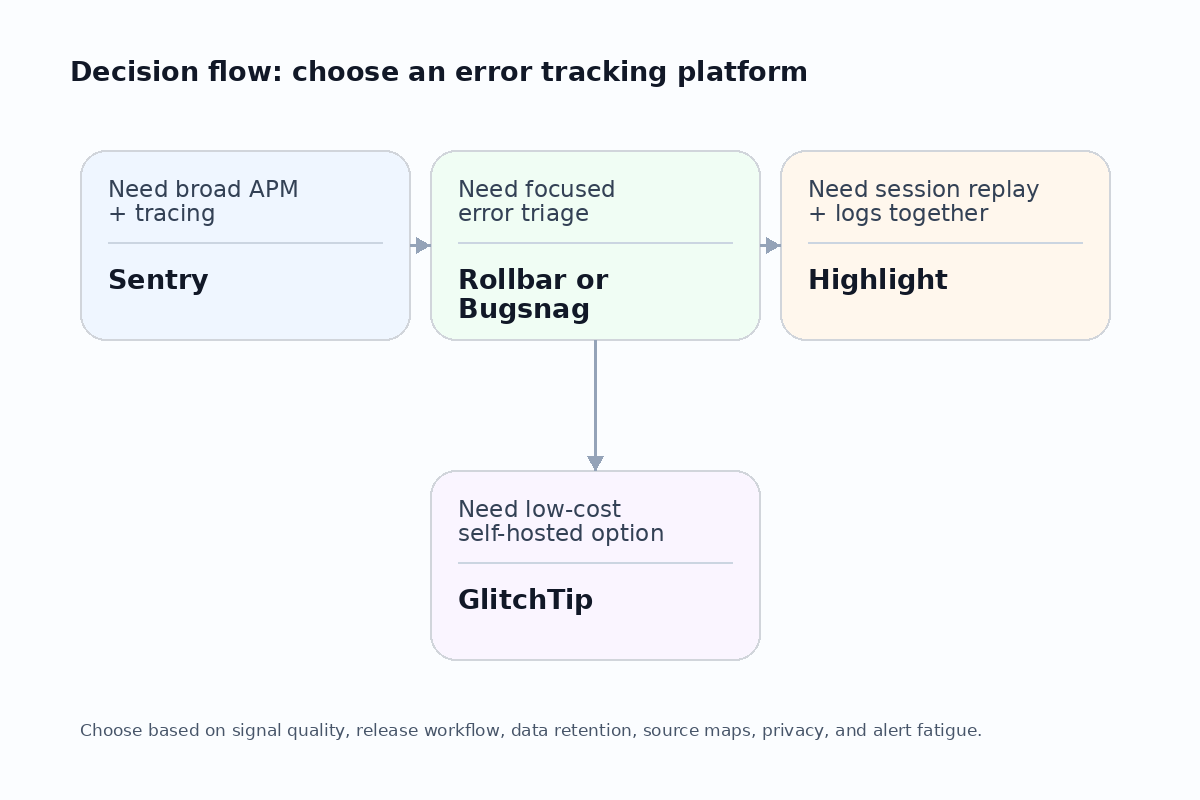
If You Want the Safest Default
Choose Sentry. It has strong Node.js support, broad full-stack coverage, and enough product depth to grow with most SaaS teams. Configure sampling, source maps, privacy rules, and quota controls early.
If You Want Focused Error Triage
Choose Rollbar or Bugsnag. Rollbar is a good fit for fast grouping, deploy tracking, and predictable limits. Bugsnag is strong when release stability, feature flag impact, and customer prioritization matter.
If Frontend Session Context Matters
Choose Highlight.io. It is useful when you need session replay, logs, traces, and errors together to diagnose real user failures.
If Budget or Self-Hosting Matters Most
Choose GlitchTip. It is a strong candidate for small teams, self-hosted deployments, or projects that want straightforward event-based pricing.
If You Already Have an Observability Platform
You may not need a huge error tracking suite. A focused tracker can sit alongside your existing logs, metrics, and traces. The key is integration: errors should link to logs, deploys, and customer impact.
Common Implementation Mistakes
Mistake 1: Installing the SDK Too Late
If instrumentation starts after your modules load, you may miss auto-instrumentation and early runtime errors. Initialize error tracking before the rest of the app starts.
Mistake 2: Not Uploading Source Maps
Minified stack traces waste debugging time. Upload source maps during CI/CD and tie them to release identifiers:
# Example: upload source maps during CI/CD
npx @sentry/cli releases files "$GIT_SHA" upload-sourcemaps ./dist --url-prefix "~/assets"
Mistake 3: Sending Too Much PII
Error context is useful, but secrets, tokens, emails, request bodies, and personal data must be scrubbed. Privacy configuration is part of production readiness.
Mistake 4: Alerting on Everything
Every exception should not page the team. Alert on user impact, revenue impact, regression severity, and release risk. Use grouping and filters to control noise.
Mistake 5: Ignoring Background Jobs
Many SaaS failures happen outside request/response paths: queues, cron jobs, billing retries, webhooks, imports, exports, and notification workers. Instrument them too.
Conclusion
The best error tracking platform for a Node.js SaaS app depends on how your team fixes production issues. If you want the broadest default, start with Sentry. If you want focused error triage, compare Rollbar and Bugsnag. If session replay and full-stack context matter, evaluate Highlight. If you need a low-cost or self-hosted option, consider GlitchTip.
The real goal is not just collecting exceptions. The goal is to shorten the path from production failure to verified fix. Capture useful context, upload source maps, connect errors to releases, protect user privacy, and tune alerts so the team can act quickly without drowning in noise.